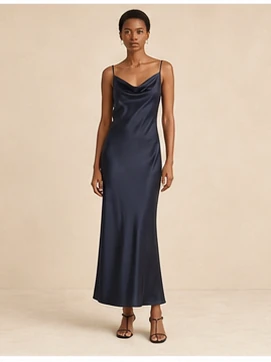
Loading WardrobeIt

AI Add to Cart for Ecommerce

Move shoppers from recommendation to cart in one conversation.

WardrobeIt confirms the product, presents supported sizes, colors and options, then adds the shopper’s final selection to the merchant cart. One product, several recommendations, or a complete look can move toward checkout without restarting the buying journey.

  • Valid variants only
  • Catalog-connected
  • Merchant checkout
  • Cart analytics
  1. 01

    Select Product

    Keep the shopper’s recommendation and product context connected.

  2. 02

    Confirm Variant

    Show only supported sizes, colors, quantities, and product options.

  3. 03

    Add and Continue

    Build the merchant cart, confirm the result, and continue to checkout.

Conversational Add to Cart in Action

Different shopping requests. One valid cart action.

Whether a shopper is adding one recommendation, choosing a variant, replacing an unavailable item, or building a full look, WardrobeIt keeps the conversation, product truth, pricing, and cart summary connected.

Scenario 01

Add the recommended product

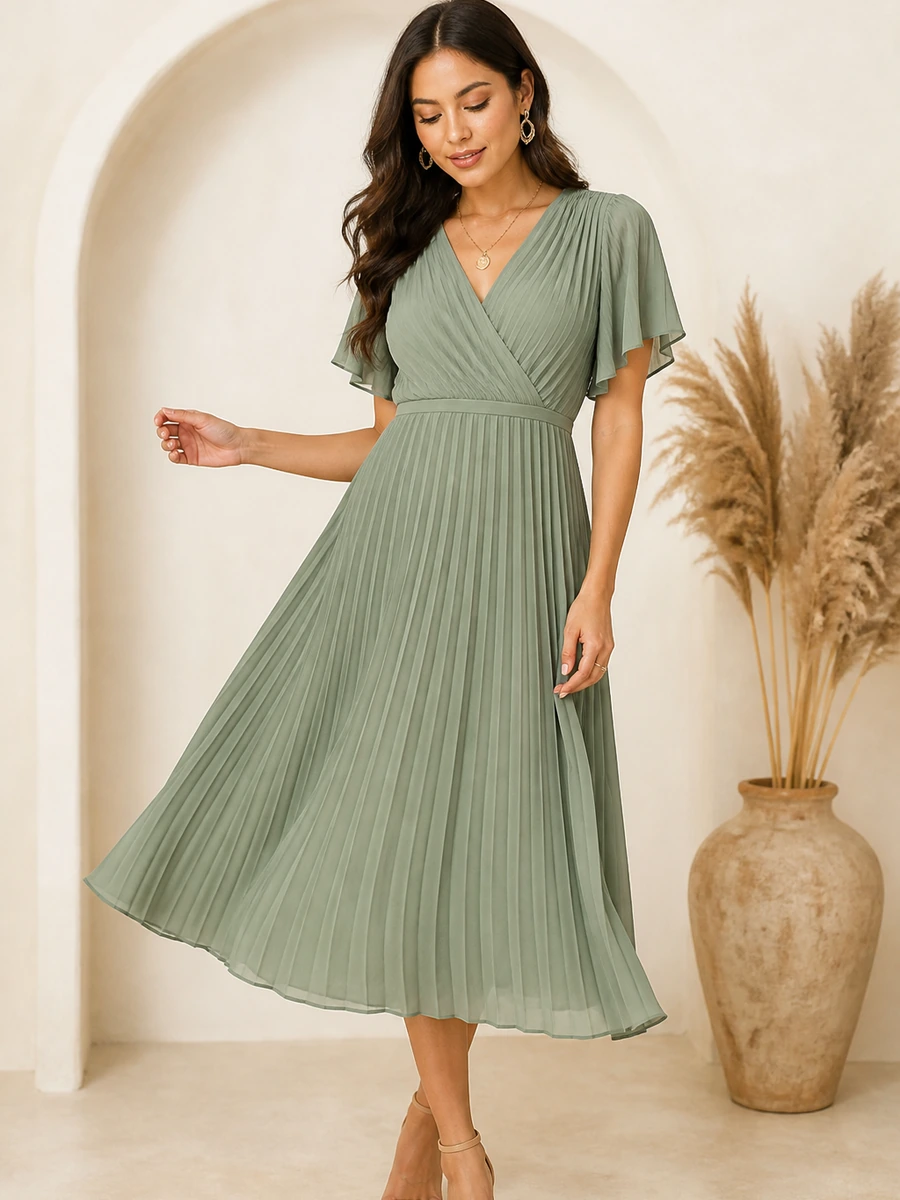
Add the first dress you recommended.

The Sage Pleated Midi Dress is selected. Choose an available size before I add it to your cart.

Product
Sage Pleated Midi Dress
Current price
$168
Selected color
Sage
Available sizes
S · M · L · XL
Required action
Confirm size
Next best action Add Medium to Cart

From Recommendation to Cart

Remove the unnecessary distance between decision and purchase.

WardrobeIt preserves shopper intent from the first request through product recommendation, variant confirmation, cart creation, and checkout continuation.

One connected commerce flow

Traditional journeys send shoppers across search, product pages, size selectors, widgets, and cart screens. WardrobeIt keeps the important decisions together and asks only for the information required to create a valid cart line.

  1. Shopper describes the need

    Capture the product category, occasion, budget, size, fit, color, urgency, and other stated preferences.

    “I need a sage dress for an outdoor wedding under $200.”

  2. WardrobeIt recommends merchant products

    Present approved catalog items with product image, price, available options, match reason, and a clear purchase path.

    • Catalog only
    • Current product data
    • Explainable match
  3. Shopper chooses the product

    Preserve the recommendation history, active product, page context, and relevant complementary options.

  4. Required variant is confirmed

    Display only the supported size, color, quantity, configuration, or other options required by the merchant platform.

    • Sage
    • Medium
    • Quantity 1
  5. Valid product is added to cart

    Send the confirmed product and variant to the connected merchant cart, then show exactly what was added.

  6. Shopper chooses the next action

    Continue shopping, complete the look, review the cart, find another product, or proceed to merchant checkout.

    • View cart
    • Complete look
    • Proceed to checkout

Product and Variant Selection

Configure the product without leaving the conversation.

WardrobeIt presents only the supported controls needed to create a valid cart line. The connected ecommerce platform and merchant configuration remain the source of truth for product options, availability, price, quantity rules, delivery choices, and checkout.

Size selection

Show applicable size options with fit guidance and a link to the merchant size chart.

M selected

Color selection

Display only color and size combinations supported by current variant data.

Sage available

Product configuration

Confirm material, finish, length, pack size, or merchant-defined options where supported.

Variant validated

Quantity rules

Respect minimums, maximums, per-order limits, bundle limits, and stock conditions.

Quantity 1

Availability states

Use clear labels such as available, limited, unavailable, or market restricted.

Available

Delivery preference

Present supported fulfillment choices while checkout remains the final source of truth.

Standard delivery

Personalization

Show initials, engraving, gift message, or custom options only when operationally supported.

Configuration-dependent

Purchase type

Offer one-time or subscription choices only when a supported workflow is active.

One-time purchase

Smart Unavailable-Item Handling

Prevent product and variant dead ends.

WardrobeIt checks applicable product and variant information before confirming the cart action. When the requested option cannot be purchased, the shopper sees a clear explanation and merchant-approved alternatives.

Original selection

Medium is unavailable in Sage.

WardrobeIt should never silently change the shopper’s product, size, or color. Each alternative explains what changed and requires shopper confirmation before the cart is updated.

Selection unavailable

Sage Pleated Midi Dress · Sage · Medium

  • Same product, another color

    Black · Medium · Same price

    Choose Black
  • Similar available dress

    Sage Soft Column · Medium available

    View alternative
  • Keep preference, review fit

    Size guidance · Restock notify option

    View fit notes

Single Product or Complete Look

Move one item or a full look into the merchant cart.

WardrobeIt supports a single confirmed product or a complete look assembled from catalog items. Shoppers can review, replace, or remove selections before anything is added.

Single Product

Add confirmed product to the merchant cart.

Confirm the supported variant, then continue shopping, complete the look, or proceed to checkout without restarting the journey.

  • View cart
  • Complete the look
  • Checkout

Complete Look

Add the selected outfit as one guided action.

Let shoppers replace, remove, and confirm every product before adding the full look.

  • Replace item
  • Remove item
  • Add more

Relevant Cross-Sell Before Confirmation

Recommend something useful without blocking the original purchase.

WardrobeIt can suggest a small number of relevant products to improve basket completeness. The original Add to Cart action remains visible, every suggestion includes a reason, and the shopper can skip with one tap.

Complete the look

Champagne Clutch

$48

Pairs with the selected dress using merchant catalog attributes.

Add Skip View

Matching accessory

Gold Drop Earrings

$24

A lightweight accessory that stays inside approved product data.

Add Skip Another

Recommended pairing

Neutral Strappy Heels

$72

Suggested footwear from available variants in the same catalog.

Add Skip Compare

Product upgrade

Premium Leather Clutch

$96

Offer a higher-priced alternative only when it exists in catalog inventory.

Upgrade Keep current

Merchant-approved add-on

Product Care Item

$18

Surface care products only when the merchant enables the add-on rule.

Add Skip

Approved combination

Wedding Guest Essentials

Current catalog pricing

Bundle only merchant-approved combinations with valid variants.

Add bundle Details

Merchant-Controlled Cart Actions

Control what WardrobeIt can add, recommend, bundle, or modify.

The assistant follows merchant-defined product, variant, inventory, offer, quantity, and permission rules. It never creates an unsupported bundle, changes a shopper’s selection, or applies an unauthorized promotion.

Variant and Stock Rules

Create only valid cart lines.

Configure required options, inventory conditions, market eligibility, unavailable-item behavior, and alternative-product logic before WardrobeIt can confirm an assistant-driven cart action.

  • Required variant confirmation Size, color, quantity, and configuration are verified before add to cart.
  • Availability validation Unavailable products and combinations are not shown as purchase-ready.
  • Shopper confirmation No silent product, color, size, price, or quantity substitution.
  • Safe error recovery Explain the failure, preserve context, and offer a realistic next action.
Explore Merchant Cart Controls

Cart Confirmation and Next Best Action

Confirm exactly what happened, then keep the shopper moving.

After a successful cart action, WardrobeIt shows what was added, the selected variant, quantity, price, updated cart value, and a short set of relevant next actions.

Next Best Action

Make the next commercial step easy to understand.

The assistant should not end abruptly after a cart update. It can preserve the current cart context and help the shopper continue with discovery, complementary products, an approved offer, or the merchant checkout.

Continue Shopping

Return to product discovery without losing the current cart.

Continue →

Complete the Look

Recommend relevant merchant products around the selected item.

Build Look →

View Cart

Review products, variants, quantities, pricing, and applicable offers.

Open Cart →

Apply Approved Offer

Show only when active merchant rules confirm eligibility.

Apply Offer →

Find Another Product

Begin another shopping request while preserving the current cart state.

Ask WardrobeIt →

Proceed to Checkout

Continue to the merchant’s existing checkout to complete payment.

Checkout →

Cart and Checkout Outcomes

Measure whether guided conversations produce meaningful cart activity.

Separate cart creation from completed revenue. WardrobeIt connects supported assistant events with product selection, cart additions, complete looks, checkout progression, purchases, and transparent attribution definitions.

Cart

Assistant-Driven Cart Additions

Track products added through qualifying WardrobeIt-assisted journeys.

  • Unique carts
  • Products added
  • Products removed
Funnel

Recommendation-to-Cart

Measure how often an eligible recommendation progresses to a cart action.

  • Impressions
  • Product selections
  • Cart actions
Sessions

Chat-to-Cart Conversion

Review supported conversations that result in at least one valid cart addition.

  • Traffic source
  • Device
  • Browser
Complete Look

Multi-Product Cart Activity

Track full-look additions, selected items, replacements, and removed products.

  • Products per cart
  • Full looks
  • Cross-sells
Value

Average Assisted Cart Value

Review current cart value separately from completed order value and attributed revenue.

  • Cart value
  • Order value
  • Revenue retention
Checkout

Cart-to-Checkout Progression

Connect assisted carts with view-cart, checkout-start, purchase, and abandonment events.

  • Checkout starts
  • Purchases
  • Abandonment

Product Walkthrough

Test conversational Add to Cart with your own store.

Use the merchant’s actual products, variants, inventory, cart, offers, checkout, and analytics configuration with WardrobeIt.

See Add to Cart in Action
  1. 1. Connect catalog and cart

    Products, variants, price, inventory, cart, checkout, and order data.

  2. 2. Define eligible actions

    Products, collections, variants, permissions, and restrictions.

  3. 3. Test product selection

    Recommendations, direct requests, product pages, and complete looks.

  4. 4. Validate required variants

    Size, color, quantity, product configuration, and availability.

  5. 5. Test unavailable selections

    Alternatives, colors, sizes, lower-price options, and safe messaging.

  6. 6. Test multi-product carts

    Removal, replacement, selected items, full look, and total calculation.

  7. 7. Validate cross-sells and offers

    Original action visible, skip works, relevance and merchant rules preserved.

  8. 8. Test checkout continuation

    Correct variants, current pricing, valid offers, and merchant checkout.

  9. 9. Validate analytics

    Recommendations, cart, complete look, checkout, purchase, and revenue.

Frequently Asked Questions

AI Add to Cart questions, answered.

Clear answers for merchants evaluating variant selection, complete looks, unavailable items, offers, Shopify carts, checkout boundaries, and performance measurement.

A conversational shopping capability that helps the shopper choose a product, confirm required options, and add the valid selection to the merchant cart.

Turn shopping guidance into cart activity

Let shoppers choose, confirm, and add products without leaving the conversation.

Connect WardrobeIt with your catalog and cart to move shoppers from relevant recommendations to valid product selections, purchase-ready carts, and the merchant’s existing checkout.

  • Confirm products and supported variants

    Use current merchant catalog and availability information.

  • Add one product or the complete look

    Shopper-controlled selections and multi-product cart actions.

  • Present relevant cross-sells and offers

    Merchant-approved, optional, and never a barrier to purchase.

  • Measure cart and checkout progression

    Keep cart value, completed orders, and revenue attribution distinct.