

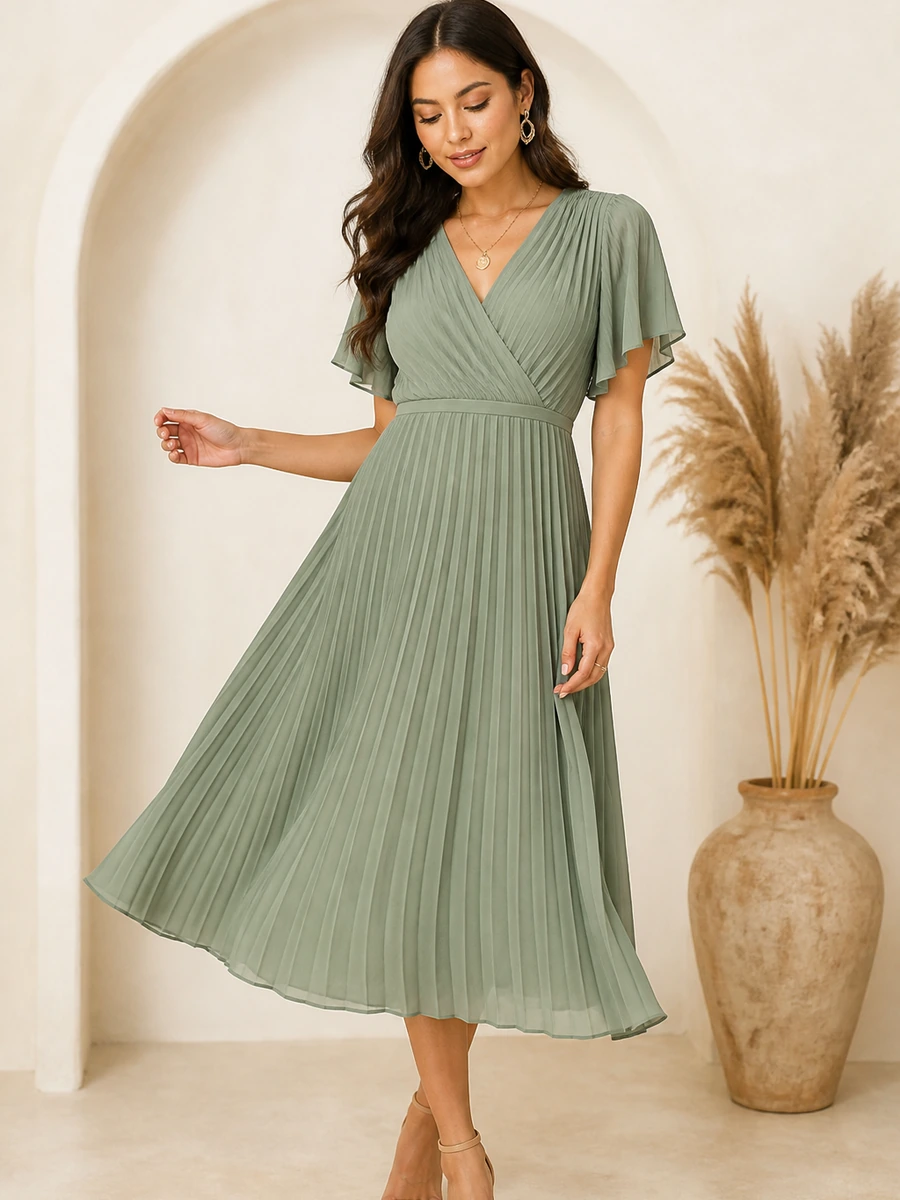
Draped Midi
$168
Catalog match
AI Post-Click Conversion for Ecommerce
Improve Paid Traffic ROI
Improve ecommerce paid traffic ROI by helping paid visitors find the right products, resolve buying friction, and move toward cart after they land on your store.
Paid media creates the click. WardrobeIt helps your store continue the intent behind it with guided product discovery, merchant-grounded answers, comparison, eligible Virtual Try-On, complete-look recommendations, cart actions, and assisted outcome tracking.
Shopping Assistant
Post-click · continue campaign intent
Summer wedding guest styles under $200 — Medium preferred.
Using available campaign and catalog context, here are merchant-owned matches that fit occasion, budget, and size.
Draped Midi
$168
Catalog match
Soirée Satin
$128
Compare
Sculpted Bag
$159
Next action
Your fit, style & sizes are saved for a better experience.
-
01
Continue Campaign Intent
Use available landing-page, product, collection, referrer, or UTM context to make the first shopping step more relevant.
-
02
Guide Product Decisions
Help visitors narrow options, ask questions, compare products, confirm variants, and move toward cart.
-
03
Measure Assisted Outcomes
Review recorded post-click activity without presenting assistance as guaranteed or incremental lift.
Where Paid Traffic Value Gets Lost
The ad can work while the store still loses the visitor.
Paid traffic ROI does not end at the click. The visitor still has to understand the landing page, find the right product, resolve questions, choose a valid variant, and reach cart.
Paid click
without progress


- 01Focus the first question
Weak landing-page relevance
A focused campaign can land on a broad collection, homepage, or product grid and force the shopper to rediscover the promised direction.
- 02Use captured context
Campaign intent disappears
Where supported context is captured, WardrobeIt can align the shopping prompt without assuming data that was not received.
- 03Accept one clear request
Too much navigation
Menus, filters, collections, size guides, and policy pages can delay product discovery, especially on mobile.
- 04Use merchant-approved facts
Questions remain unanswered
Fit, material, delivery, returns, availability, or promotion questions can block variant selection and cart progression.
- 05Record assisted activity
Paid sessions cannot be explained
Supported assistant interactions can fill the gap between landing page and cart when source and session data are reliably connected.
Continue Campaign Intent After the Click
Make the store journey match the ad promise.
WardrobeIt can use available page and campaign context to create a more relevant starting point without assuming information that was not captured.
“Shop wedding guest dresses under $200 for an outdoor event.”
Product ad
Advertised product
Check variants, questions, alternatives
Collection ad
Broad collection
Narrow by size, color, event, budget
Promotion
Eligible collection
Never invent offer terms or expiry
Creator
Approved look
Use names or likeness only with permission
Retargeting
Selected landing context
Do not claim recognition without consent
Source data
Supported fields only
Landing page, referrer, UTM, configuration
Context boundary
Campaign information should be used only when captured through a supported landing page, URL parameter, referrer, merchant configuration, or active integration.
Product ads
Start from the advertised product page.
Search ads
Use captured landing and query context.
Social campaigns
Continue approved campaign themes.
Influencer links
Use approved creator context only.
Landing pages
Begin from product or collection context.
A relevant opening question
“Are you shopping for a daytime or evening event, and what size should I check?”
Match Paid Visitors with Relevant Products
Move from campaign interest to a useful first step.
Paid visitors may know why they clicked, but not which exact product to choose. WardrobeIt can turn supported context and shopper language into guided catalog discovery.
- 1
Recognize the entry point
Start from a product, collection, search, social, influencer, retargeting, or promotional landing page.
- 2
Use only available context
Supported fields may include landing page, referrer, UTM values, merchant identifiers, and product or collection context.
- 3
Ask one relevant question
Capture the occasion, environment, size, color, budget, category, or style detail that sharpens the catalog path.
Paid Traffic Shopping Playbooks
Different traffic sources need different starting points.
Merchants can shape the onsite experience around landing page, campaign theme, product context, and supported tracking information without implying direct ad-platform control.

Meta prospecting
Visual discovery · style · budget
When source is captured

Google Search
Clear need · requirements · Q&A
When source is captured

Google Shopping
Product · variant · alternatives
When source is captured

TikTok campaign
Featured style · similar products
When source is capturedSource-aware onsite paths
Supported context only- 01
Natural-language discovery
Narrow products by shopper intent
- 02

Product evaluation
Questions, comparison, eligible try-on
- 03

Supported cart path
Confirm product and valid variant
Source boundary
Platform labels can represent captured visitor source. They do not imply direct Meta, Google, TikTok, or analytics integration unless that connection is active and verified.
Visual discovery
Style inspiration, similar products, and eligible Virtual Try-On.
Specific requirements
Feature matching, merchant-grounded Q&A, and comparison.
Product evaluation
Variant confirmation, alternatives, and supported cart action.
Promotion rules
Use merchant-approved eligibility and terms only.
Paid Visitor Journey
Connect the click with a supported product decision.
Move from captured campaign context to a relevant catalog path, product evaluation, and a valid next action.
Step 01
01Visitor arrives
Entry may come from a product, collection, search, social, creator, retargeting, or promotional campaign.
Ad click → merchant landing page
Step 02
02Available context is recognized
Use landing page, referrer, UTM values, merchant identifiers, or product and collection context only when captured.
Supported fields, not assumed attribution
Step 03
03A relevant question is asked
Ask for the missing detail most likely to focus the product path.
“Daytime or evening event, and what size?”
Step 04
04Shopper preferences are identified
Capture occasion, environment, size, color, budget, category, and style direction.
Outdoor · Medium · sage · under $180
Step 05
05Matching products appear
Show merchant product images, names, current price, applicable availability, and match explanations.
Merchant catalog products only
Step 06
06The visitor continues
View, compare, ask, try on where eligible, complete the look, select a valid variant, or add to cart.
Product evaluation → supported cart path
Step 1 of 6
Resolve Buying Friction in Real Time
Give paid visits the guidance required to progress.
WardrobeIt combines discovery, product Q&A, comparison, eligible Virtual Try-On, complete-look recommendations, and cart actions inside one guided shopping experience.

Product decision
Confirm a supported product and variant
Merchant-grounded details · Applicable availability
- Interpret shopper intent and search the catalog
- Answer supported product and store questions
- Compare leading products and valid options
- Continue to a supported cart action
Supported variants
Compare before deciding
Compare price, material, fit, style, occasion, features, care, and availability using supported merchant data.

Option A
Merchant product

Option B
Merchant product
Answer buying questions
Use merchant-approved product data and policies; never invent fit, stock, delivery, returns, or promotion facts.
“Is this suitable for my event?”
Answers remain grounded in connected merchant information.
Use eligible visual and outfit tools
Virtual Try-On is a generated preview, not a guarantee of physical fit or appearance. Complete the Look uses catalog-only recommendations and applicable availability.
Tracking and Attribution Boundaries
Preserve campaign context without overclaiming attribution.
A credible setup preserves available context, records supported assistant interactions, connects commerce outcomes where available, and documents the data source.

Landing URL · referrer · UTM · merchant identifier
Campaign context
Only fields captured through supported sources.

Opened · started · intent captured · recommended
Assistant events
Recorded interactions under the active event model.

Clicked · compared · asked · tried on where eligible
Product evaluation
Supported engagement between landing and cart.

Variant · cart · checkout · order where connected
Commerce events
Recorded outcomes depend on active connections.

Assisted participation ≠ incremental lift
Reporting
Causal lift requires a controlled test or valid experiment.
Ad-platform fields appear only when passed through a supported field or connected system.
Direct platform reporting must be production-ready, authenticated, tested, and supported.
Campaign Controls in the Merchant Portal
Configure how WardrobeIt supports important campaigns.
Ecommerce teams can guide campaign-specific shopping paths when the relevant Merchant Portal controls and context are active.
WardrobeIt Merchant Portal
Campaign controls
- Opening promptsAssign approved prompts to selected pages
- Product prioritiesPrioritize eligible campaign products
- Audience guidanceAdjust questions to approved campaign themes
- ExclusionsRestrict unavailable or unsupported paths
Illustrative campaign setup
Merchant rule
Configured boundary
The campaign sets the promise. The merchant defines the rules.
WardrobeIt guides the shopper within active product, availability, promotion, and cart boundaries.
Opening prompts
Relevant prompts for selected pages or campaign URLs.
Product priorities
Eligible products without overriding shopper relevance.
Audience guidance
Campaign themes, not unconnected platform audience data.
Offer rules
Merchant-approved eligibility, dates, limits, and exclusions.
Guardrails
Restrict unsupported claims, products, promotions, or actions.
Measure and Improve Paid Traffic Outcomes
Understand what paid visitors do after they arrive.
Review the journey between landing page, product discovery, evaluation, cart, and purchase.
- 1Traffic quality
Assistant engagement by captured source, discovery success, questions, recommendation clicks, and documented high-intent actions.
- 2Conversion progression
Chat-to-cart by campaign, recommendation-to-cart, eligible try-on-to-cart, checkout progression, and assisted conversion.
- 3Revenue efficiency
Assisted revenue, assisted order value, revenue per assisted session, and products purchased by captured source.
- 4Improvement actions
Use onsite evidence to review landing content, message alignment, product data, imagery, fit guidance, policies, and availability.
- 5Testing guidance
Use randomized splits, controlled landing tests, holdouts, or documented matched cohorts when estimating incremental lift.
Paid traffic outcome review

Traffic quality
Observed onsite behavior

Assisted outcomes
Participation under defined rules

Incremental lift
Requires a valid experiment
Frequently Asked Questions
Clear answers for evaluating post-click paid traffic support.
Claims remain conditional on merchant data, active capabilities, supported campaign context, and the chosen measurement method.
AI can support paid traffic ROI by helping campaign visitors find relevant products, resolve buying questions, compare options, select valid variants, and move toward cart after clicking an advertisement. Actual results depend on traffic quality, catalog data, product availability, store experience, implementation, and measurement method.
Poor ecommerce paid traffic ROI often comes from weak campaign-to-landing-page alignment, broad product pages, poor discovery, missing product information, size uncertainty, unavailable variants, delivery concerns, cart friction, checkout friction, or weak measurement.
Start by separating traffic quality problems from onsite conversion problems. Then review landing-page relevance, product discovery, product questions, variant availability, cart progression, checkout performance, and completed revenue.
An ecommerce chatbot can support paid traffic conversion when it understands landing-page context, accesses merchant catalog data, recommends relevant products, answers buying questions, and connects guidance with cart actions.
WardrobeIt helps paid visitors continue from the campaign landing page, explain what they need, find relevant products, ask questions, compare options, use eligible Virtual Try-On, build complete looks, confirm variants, add products to cart, and continue toward checkout.
No. WardrobeIt supports the onsite shopping journey after the click. It should not be presented as managing bids, budgets, media buying, audiences, ad creative, or campaign optimization.
Direct ad-platform integrations should only be described as active when implemented, authenticated, tested, and supported. WardrobeIt can still use available landing-page, referrer, and UTM context without claiming a direct ad-platform connection.
Campaign reporting can use UTM and landing-page information when the merchant’s implementation captures and preserves those values. Supported fields should match the active event and session configuration.
Yes, when reliable campaign context is captured and linked with eligible WardrobeIt sessions and cart events. Merchants should define the qualifying session, cart event, attribution window, and exclusion rules.
No. Assisted revenue shows that WardrobeIt participated in the recorded journey. Incremental revenue estimates the revenue that would not have occurred without WardrobeIt and requires an appropriate control or experiment.
WardrobeIt can contribute onsite conversion and assisted revenue data. A complete ROAS calculation requires accurate advertising spend and a documented attribution method.
No. WardrobeIt is designed to address onsite product-discovery, buying-confidence, and cart-progression friction after the click. Actual results vary and should be evaluated with verified merchant data and a proper testing framework.
Improve Paid Traffic ROI
Convert more of the traffic you already pay for.
Use WardrobeIt to guide paid visitors toward relevant products, resolve buying friction, connect product interest with cart actions, and measure the supported onsite journey between the click and completed purchase.
From paid campaign
Sage Slip Dress
$148 · Landing context captured
Continue from the ad
Outdoor wedding guest looks under $200
Using the captured campaign landing context and this product, I can narrow alternatives, check variants, and answer buying questions from your catalog.